
Kage
February 3, 2026 - One Tool A WeekA native macOS menu bar app that monitors local dev servers with AI-powered intelligence.
The Problem
I keep finding myself in this stupid situation: I have five Cursor windows open, each running a different dev server, and suddenly port 3000 won’t start. I know something is already using it, but which project? Which terminal? I end up doing lsof -i :3000 and killing PIDs manually, or worse, closing random terminals hoping I’ll find the right one.
The real pain isn’t just the port conflicts. It’s the complete lack of visibility. What servers are actually running right now? Which ones are idle and wasting RAM? Did that server crash or is it still running from yesterday? I need a mission control view of my dev environment.
The Solution
Kage (影, meaning “shadow” in Japanese) is a native macOS menu bar app that gives me instant visibility into every dev server running on my machine. Click the menu bar icon and I see everything: port numbers, process names, how long they’ve been running, and most importantly, AI-generated descriptions of what each server actually is.
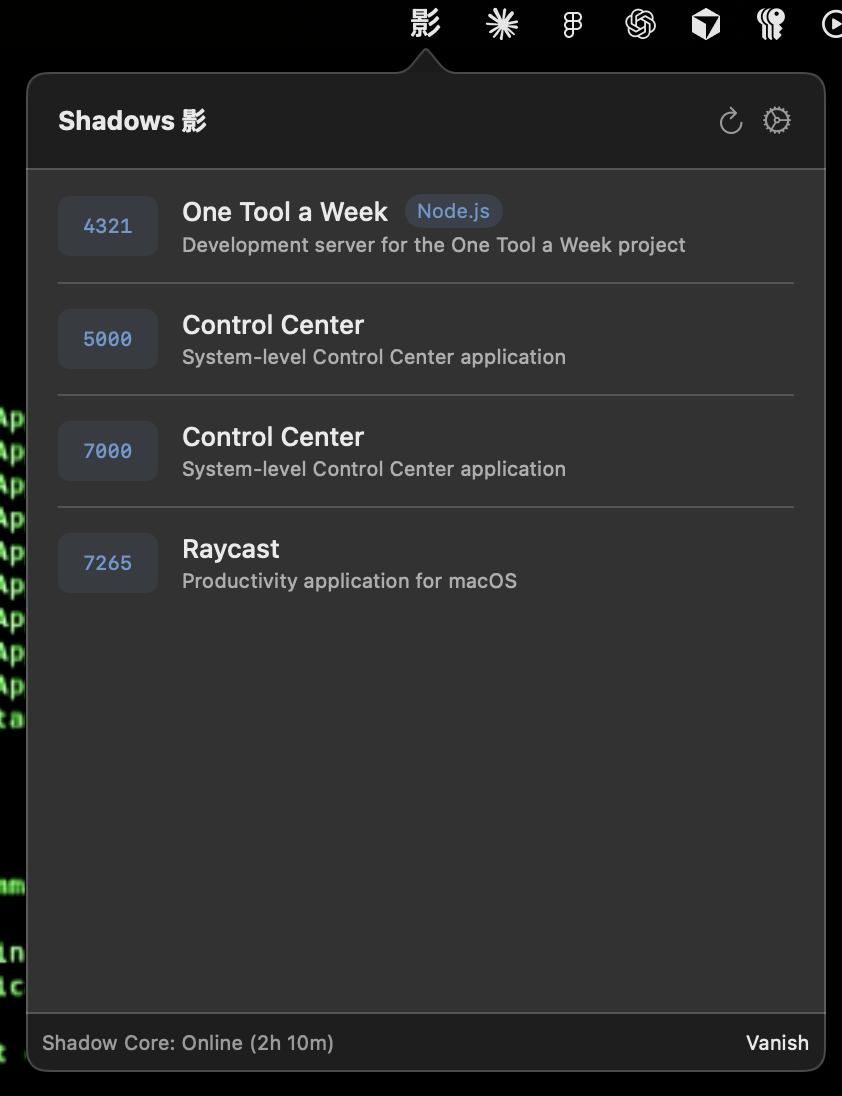
The name comes from the idea that the daemon runs silently in the background, like a shadow, always watching but never intrusive. Plus it gave me an excuse to learn Rust properly and build something at the system level instead of yet another web app.
What makes Kage different:
- Always-On Monitoring - Rust daemon runs continuously, lightweight and fast
- AI-Powered Context - Claude analyzes process info and tells me “Clara Time-Off Tool” instead of “node server.js”
- Unix Socket Architecture - Proper daemon/client separation, secure by design
- Native macOS - SwiftUI menu bar app that feels right at home
How It Works
The architecture is split into two completely separate programs that communicate over a Unix domain socket. This was the most important decision I made and it’s what makes Kage feel professional rather than hacky.
The Daemon Layer
The Rust daemon (kaged) does one job: monitor processes and serve data. It uses lsof to find processes listening on ports 3000-9000, filters for dev servers (node, python, vite, rails), and collects the PID, port number, command line, working directory, and uptime. The entire scan takes less than 100ms.
The daemon listens on a Unix socket at ~/.kage/daemon.sock with permissions set to 0o600 so only I can access it. This is way more secure than running an HTTP server on localhost because filesystem permissions enforce access control at the OS level. Even a malicious browser tab can’t reach a Unix socket.
I looked at how Docker Desktop does this and copied their pattern. The Docker daemon runs as a background service and the UI connects via Unix socket. Same idea here: the daemon has no UI, no dependencies on the frontend, and could theoretically serve multiple clients (a CLI tool, a web dashboard, whatever).
The SwiftUI Frontend
The menu bar app is pure SwiftUI. When you click the icon, it opens a popover that connects to the daemon’s Unix socket and fetches the server list. The UI polls every three seconds to keep things fresh but doesn’t hammer the daemon. I built a custom UnixSocketClient that handles connection retries and proper error messages instead of using the generic Network framework.
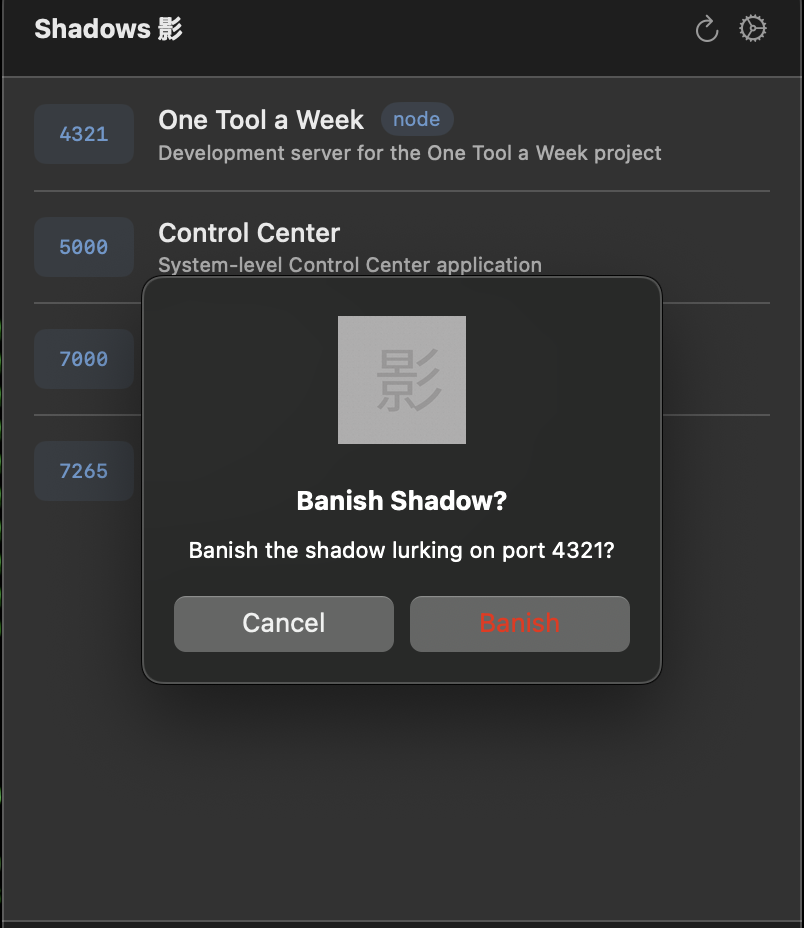
The kill functionality sends a simple JSON command to the daemon, which handles the actual process termination. The UI is just a view layer, all the real work happens in the daemon.
The AI Layer
This is where it gets interesting. The daemon returns raw process info like node /home/dev/projects/a8f2b9/server.js which is useless. What is a8f2b9? The SwiftUI app takes that raw data and sends it to Claude with a simple prompt asking for friendly labels and status indicators. Claude analyzes the working directory, the command, any package.json or git info it can infer from the path, and returns something like “Time-Off Management Tool (feature/holidays branch)”. Now I actually know what I’m looking at.
Architectural Decisions
Why Rust for the daemon? Performance and safety. The daemon needs to run 24/7 without leaking memory or crashing. Rust’s ownership system guarantees memory safety without garbage collection pauses. Plus the compiled binary is tiny (under 5MB) and uses minimal RAM.
Why Unix sockets instead of HTTP? Security and simplicity. Unix sockets can’t be accessed from the network or even from the browser. Filesystem permissions enforce access control at the OS level. This is how Docker, Postgres.app, and every serious daemon on macOS works.
Why separate daemon and UI? Because the daemon should run even when the UI is closed. I want continuous monitoring, not just when I remember to open the app. Also, this architecture means I could add a CLI tool later that uses the same daemon. Clean separation of concerns.
Why SwiftUI instead of Electron? Native feel and performance. Electron apps are bloated and don’t integrate well with macOS. SwiftUI gave me proper menu bar integration, Keychain access, and the app feels like it belongs on macOS.
Technical implementation details
The daemon uses tokio for async I/O and sysinfo for process monitoring. The Unix socket server is built with tokio::net::UnixListener which handles connections concurrently.
For process detection, I scan for common dev server patterns:
- Port range: 3000-9000 (typical dev server range)
- Process names: node, python, ruby, vite, next-dev, etc.
- Exclude system processes and databases
The SwiftUI app uses the Network framework for Unix socket communication and stores the Claude API key in Keychain using the Security framework. The UI polls the daemon every 3 seconds using a Timer publisher.
Communication protocol is newline-delimited JSON. Simple, debuggable, and easy to test with nc -U ~/.kage/daemon.sock.
Outcome
Kage shipped in four days and immediately became part of my daily workflow. I haven’t manually killed a process with lsof since. The menu bar icon shows how many servers are running, and clicking it gives me instant context.
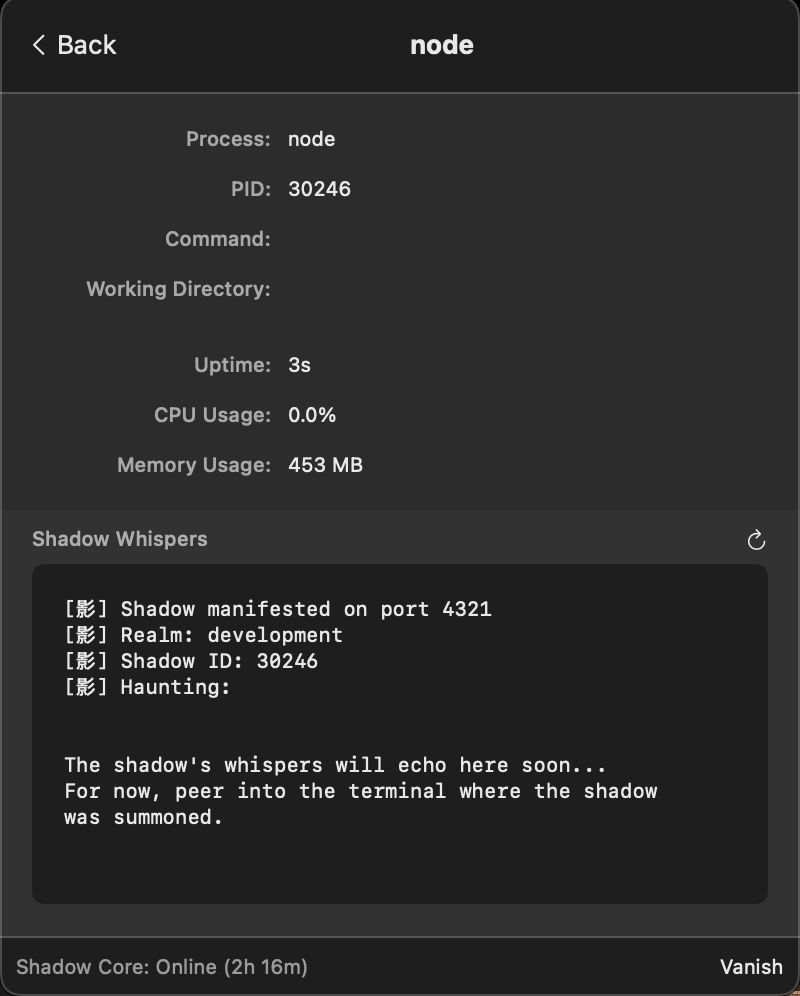
The daemon uses about 8MB of RAM and negligible CPU. The AI analysis adds maybe 500ms of latency when you first open the menu, but it caches results so subsequent views are instant.
More importantly, building this taught me way more about systems programming than any web project would have. I actually understand Unix sockets now. I know how process monitoring works. I’ve written production Rust code that handles errors properly.
What I Learned
Rust has a steep learning curve but it’s worth it. The borrow checker fights you at first, but once you understand ownership, you write better code in every language. Plus the ecosystem is excellent. Tokio, serde, sysinfo all just worked.
AI integration doesn’t have to be complex. I didn’t need embeddings or RAG or fine-tuning. Just a well-crafted prompt with the right context. Claude looks at the process info and figures it out.
Native apps matter. SwiftUI was harder than building an Electron app would have been, but the result feels professional. It integrates with macOS properly. The Keychain integration alone would have been painful in Electron.
Security by architecture. By keeping secrets in the UI layer and the daemon stateless, I eliminated entire classes of vulnerabilities. The daemon has nothing to steal. The socket has filesystem permissions. Simple.
The code is available upon request and if there is enough interest, I might actually turn this into a real product. For now it’s shipping as tool number 4 of 52.
影 - working in the shadows, always watching.